BurnInTest Windows - FAQ
We have compiled answers to commonly asked questions in our BurnInTest FAQ below. You can also discuss any questions or suggestions you may have at our BurnInTest Discussion and Support forums, as well as read solutions for issues that have been previously answered.
If you need further assistance, please feel free to contact us by e-mail at help@passmark.com
Frequently Asked Questions (FAQ)
BurnInTest Windows Edition
What Happened to BurnInTest Standard and BurnInTest Professional?
Updated: 26/10/2020
BurnInTest Standard has been discontinued and is no longer available for purchase. BurnInTest Professional has been renamed BurnInTest Windows Edition. BurnInTest Windows is identical to BurnInTest Professional, only the name has changed.
If you have previously purchased BurnInTest Professional Edition, please download BurnInTest Windows Edition instead. All Customers with a BurnInTest Professional license and active support, will continue to receive support and updates through the renamed BurnInTest Windows Edition. Your current BurnInTest Professional Edition license key will still work with BurnInTest Windows Edition.
Since BurnInTest Standard Edition has been discontinued it will no longer receive any software updates. Customers with a BurnInTest Standard license and active support when the Standard Edition was discontinued, can access a free BurnInTest Windows Edition license by signing in to your PassMark Account. If you have not set up your PassMark Account, please use the "Forgot password?" link with your purchase e-mail address to create your account.
License Key Questions
Why isn't my License Key working?
Both the Username and Registration Key must be correctly entered before the software turns itself into the registered version. See this step-by-step guide for help.
- Keys from V9.0 of BurnInTest will work in V9.0 of BurnInTest.
- Keys from V8.0 of BurnInTest will work in V8.0 of BurnInTest.
- Keys from V7.0 of BurnInTest will work in V7.0 and V7.1 of BurnInTest.
- Keys from the 32bit version of BurnInTest will work in the 64bit edition of BurnInTest.
- Keys from BurnInTest V1, V2, V3, V4, V5, V6, V7 & V8 will not work in BurnInTest V9. But you can upgrade here.
- Keys from BurnInTest Standard edition will not work in BurnInTest Professional edition.
- Keys from BurnInTest for Linux will not work in BurnInTest for Windows.
If you purchased BurnInTest V8 within 6 months of BurnInTest V9.0 being released, you are entitled to a free upgrade to BurnInTest V9.0. You can request a new key from the BurnInTest free upgrade page.
How many licenses will I need if I purchase BurnInTest?
Once purchased, a license is perpetual and does not require renewal. The initial purchase also includes 12 months of support and software updates, which can be extended annually if required. You need 1 license per machine that is running the software, or has the software installed at the same time.
- Example 1: You have a PC production line that produces 10 machines per day. You test each machine during the night. A maximum of 10 machines are running the software at any one time, and you re-image the machine before shipping. 10 Licenses are required.
- Example 2: You are a company that takes delivery of no more than two new machines at a time. You want to burn in both machines at the same time. 2 licenses are required, assuming you uninstall the software before putting the machine into service.
- Example 3: You have 5 staff in the field repairing PC's. Each technician carries a copy of BurnInTest with them on a USB drive. 5 licenses are required assuming the software is always run from the USB drive.
Unlimited usage: Site licenses are available for coverage for an unlimited number of users within a single organization within a single country.
I have lost my registration key; how can I get it back?
Mail us at help@passmark.com telling us the name that was used to register the software, your E-mail address, the name of the product (BurnInTest), and roughly the date when the software was purchased. We will mail your key back out to you.
I have a license start-up error, what does it mean?
"License key has either an invalid Username or User ID Number"
Your license key is incorrect, or the format is incorrect. Please check the username/key from the email you received and check that it is for the specific version of BurnInTest that you purchased, e.g., BurnInTest V6.x Professional.
"Startup Error Number 1"
BurnInTest cannot find the license information. When running from a CD, USB drive, BartPE or WinPE, you need a file called key.dat in the BurnInTest directory with your license key in it (or the evaluation equivalent). You should create your BurnInTest directory using, File -> Install BurnInTest to a USB drive, as this process creates the necessary files for the CD, USB drive, BartPE plugin directory or WinPE Program Files directory. The key.dat file must not have blank lines contained in it. See help topics: Test automation and productivity, Installing BurnInTest to a USB drive.
"Startup Error Number 7"
The license key is for other PassMark software, but not the version of BurnInTest v8.0 you are trying to use. If you have purchased BurnInTest Standard, please make sure you downloaded BurnInTest standard (https://www.passmark.com/downloads/bitstd.exe). If you have purchased BurnInTest Professional, please make sure you download BurnInTest Professional https://www.passmark.com/downloads/bitpro.exe).
What is the difference between the trial version and the paid software?
There is no limit in the testing capabilities of the software, the only restriction is the length of time you can run tests. With the trial version of BurnInTest, you are limited to running tests for 15 minutes at a time.
Install and Uninstall
How do I install the software? I need some help to "Unzip" the file I have just downloaded.
Most of our software is now distributed in self extracting archives ('.exe' files) so you do not need to 'unzip'. However, some download sites prefer the Zip version. If you need help to unzip a file, see our Unzipping page.
I do not need to do any more tests; how do I uninstall BurnInTest?
Use the "Add / remove programs" icon in the Windows control panel.
Does BurnInTest V9.0 support the use of BurnInTest V8.x configuration files?
Yes. BurnInTest will read a V8.x configuration and automatically convert this to a V9.0 configuration file.
General Usage
The test run stops after 15 minutes, why?
With the trial version the tests will only run for 15 minutes at a time. After the software has been purchased, the time is unlimited. Note that you can still get a much longer test run in the trial version by clicking on the Go button each 15 minutes After the software has been purchased the test duration can be increased from the, ‘Auto Stop’ field in the ‘Test preferences’ window.
How does BurnInTest work? Doesn't it just wear my computer out?
Societies’ reliance on computers means that the cost of hardware failure can be enormous (and embarrassing). BurnInTest thoroughly exercises PC hardware in the shortest amount of time so intermittent or hidden problems are found before they turn into a disaster. The typical life span of the main moving component in a PC, the hard drive, is quoted at around 300,000 hours by manufacturers such as Seagate. The use of BurnInTest for a 6-to-12-hour period would thus have a no significant impact on the life of the drive. On the other hand, it would allow manufacturing faults and intermittent faults to be detected in a controlled manner when the consequences of failure are minimal. The situation is the same for more modern SSDs, a test lasting several hours will still only be a tiny percentage of expected lifespan for the hardware.
How long should I run BurnInTest for?
Not an easy question. In our opinion, the chances of finding a problem in the first hour are relatively high, (the system gets hot, it is the first run across the disk / CD and the first use of some of the drivers). Then every hour after that, the chance of finding a hardware problem drops significantly. The extra benefit of doing 12 hours compared to 6 hours is thus probably not great. What is desirable however is having the test run long enough so that the entire surface of the hard drive is tested. For a small fast SSD, this might be just 1 hour, but for slower large drives this might be 24 hours. Other nice technique is temperature cycling. All major manufacturers of electronic equipment do this, they have large ovens and fridges in which they test equipment. The expansion and contraction of components and solder joins brings to light many problems. You could do 6 hours On, 6 hours Off, then 6 hours On, to get some limited temperature variation like this. NASA and the Army load their equipment on to vibration machines, but this may be going too far for home / office use.
What duty cycle setting should I use?
See the page BurnInTest - What duty cycle setting should I use?
BurnInTest fails to start or crashes on start, what can I do to debug this?
See the page BurnInTest for Windows - Startup Debugging
About systems with low amounts of RAM
See the page BurnInTest - About systems with only 4GB RAM
Test Setup and Information
I have a quad core/ dual core/dual CPU system, does BurnInTest test all CPUs?
Yes. BurnInTest starts test threads for each CPU, CPU core and Hyperthreaded CPUs. This can be seen from the Windows Task Manager (Performance tab).
Are there any recommendations when using the USB2.0 Loopback plugs with BurnInTest?
V7.0.1000 (or higher) of the device driver should be used with BurnInTest V7.x (or higher). V6.1.1 of the device driver should be used for BurnInTest V6.0 or earlier.
Can I test my FireWire ports? How?
Yes. For FireWire port testing, PassMark suggest using an External Hard Disk with a FireWire interface and the BurnInTest disk test.
How can I test my Trusted Protection Module (TPM)
See the page BurnInTest - Testing a TPM
How can I use BurnInTest to test for counterfeit oversize capacity USB drives?
See the page BurnInTest FAQ - Testing for fake counterfeit USB drive capacity
BurnInTest does not have a test for my specialized hardware. Can I add my own test to be run with the other tests?
Yes. If you have specialized hardware that BurnInTest does not test, you can write your own test and integrate it with BurnInTest V7. Up to 5 plugins can be specified. PassMark has developed plugins for the following tests:
- Touch screen testing, using PassMark's MonitorTest software
- Modem testing, using PassMark's ModemTest software
- Keyboard testing, using PassMark's KeyboardTest software
Sample software in C and C++ is also available to assist developing a plugin for your specific hardware.
Can I setup BurnInTest to self-boot (e.g., from a USB drive) to test my system without an operating system?
See the page BurnInTest FAQ - Making BurnInTest Self Bootable with PassMark WinPE Builder
Can I setup BurnInTest to boot from a PXE Server?
See the page BurnInTest FAQ - How do I setup BurnInTest to boot from a PXE server?
I having trouble setting the 'lock pages in memory' in Windows XP?
Windows XP security rights can be complex to set up and manage. If you have followed the instructions in the help file for setting the 'lock pages in memory' right and still have a problem, try setting this right for "Everyone" and not just for the "Administrator".
I want to test my tape drive; how do I know what device ID to use?
If your system has only a single tape drive, then the system device identifier will be tape0, and the physical definition will be \\.\tape0. If you have more than one tape drive, then their physical definition would be automatically assigned by Windows (NTDETECT.COM in NT) at startup in the increasing order of their SCSI id's. If you have two tape drives with SCSI id's 3 and 5, then the tape drive with SCSI id 3 would be \\.\tape0 and the tape drive with SCSI id 5 would be \\.\tape1. For BurnInTest you only need to enter the device identifier (TAPE0, TAPE1, etc..). You must have a windows device driver installed to use the tape drive. If it is not working, this is the thing to check. Note also that Windows 9x do not support tapes drives.
How can I get BurnInTest to detect mapped network drives?
Due to the way UAC works in windows (7, 8 & 10) often when a network drive is mapped to a specific user a program running with elevated Administrator rights (as BurnInTest does) will not be able to see it. To solve this, you can edit the registry to enable it by adding a EnableLinkedConnections value:
- Click Start, type regedit in the Start programs and files box, and then press ENTER.
- Locate and then right-click the registry subkey HKEY_LOCAL_MACHINE\SOFTWARE\Microsoft\Windows\CurrentVersion\Policies\System.
- Point to New, and then click DWORD Value.
- Type EnableLinkedConnections, and then press ENTER.
- Right-click EnableLinkedConnections, and then click Modify.
- In the Value data box, type 1, and then click OK.
- Exit Registry Editor, and then restart the computer.
Which network test should I use, standard or advanced?
There are two network tests in BurnInTest, a standard and an advanced one.
- Use the standard network test for quick and simple testing of the network cards and where more than one system under test exists on the same network.
- Use the advanced network test for more in depth, full duplex load testing and where only one system under test will exist on the network.
The standard test is a ICMP_ECHO (ping) test, it requires a destination IP address to be entered and the network card will ping this destination IP and report on the number of errors (packets that are never acknowledged as received). This is a simple test designed to ensure the network card has an IP and can't communicate with other network equipment. Be aware that ping packets can be dropped by network hardware if load levels are too high or the network hardware has security settings setting disabling ping responses.
The advanced test requires one or more systems on the network to be running the Endpoint application (packaged with the BurninTest installer) and is designed for stability and load testing, it is a peer to peer TCP/IP test that opens a network connection between the NICs on the test system and one of the detected Endpoint systems. Test settings allow the test to be run as half or full duplex, allow validation of data sent and received and target a specific network load percentage. BurnInTest will attempt to maintain the target speed load of the network card by inserting sleep periods into the send and receive threads, this is not the exact speed the test will run at but a rough average of the speed BurnInTest will attempt to maintain. Only one instance of the BurnInTest can be running the advanced network test on the same network.
Can I test two network cards on the same system connected to each other?
BurnInTest FAQ - Test network cards on the same system using crossover
Two network cards on the same system connected directly with a network cable can be tested by the standard network test however care must be taken when setting the test up to have it work as expected.
First connect the two network cards directly with a network cable and assign each network card a static IP, e.g., 192.168.0.1 and 192.168.0.2.
Next open the network test settings, BurnInTest users the entered IP addresses and assigns them to a network card based on the order as seen by the operating system, they cannot be assumed to be in name or IP order.
To check what order BurnInTest see the cards in select the Advanced network test option and then click the Advanced test options button. This will display the list of available network cards, see the picture below for an example and note that network card with the 192.168.0.2 IP is the first in the list.
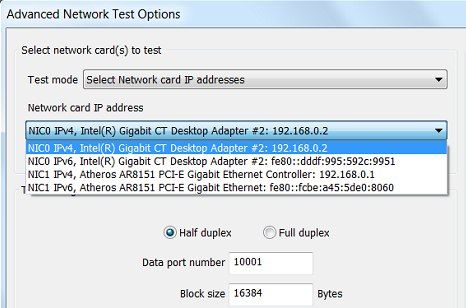
Close this window and reselect the standard network test option.
Select the "All available physical ethernet ports" option and for the first address to be tested enter the IP address that was not the first entry shown by the advanced network test, in this case 192.168.0.1.

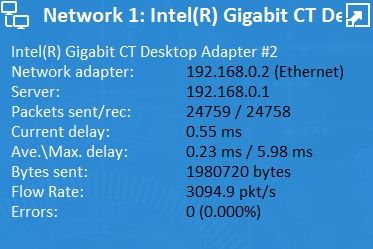
Now when the test runs it will find the first network card, 192.168.0.2, and start testing to the address 192.168.0.1, as seen in the example below.
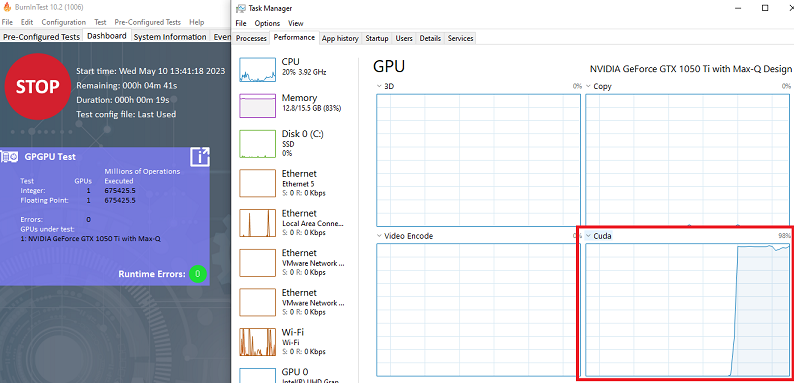
GPU Compute Utilization in Task Manager
The GPU Utilization in Windows Task Manager may not show the correct GPGPU workload when running BurnInTest Windows V10.2.1006 or later. Starting in V10.2.1006, when the GPGPU test is ran under OpenCL (instead of Direct Compute), you can view the workload by selecting the "CUDA" or "Compute #" graph.
Problems During Testing
My system crashed after X days of running BurnInTest but after a reboot was OK again?
Here are some general comments about occasional system crashes.
Common causes for a system crash are device driver and hardware problems. When a system crashes it will display a diagnostic screen (Blue Screen Of Death) or restart, depending on your systems configuration. If a BSOD is displayed it may display helpful information, such as the name of the device driver that crashed. If this is the case, then update that driver, or uninstall the related hardware/driver if possible. Otherwise, you can use this diagnostic information to search the Internet for possible solutions to your problem. If your system is configured to restart on a system failure (System->Advanced->Startup and recovery, Settings->System failure=automatically restart), then investigating a Kernel memory dump (e.g., \Windows\Minidump\*.dmp) can be helpful to identify the faulty component.
Excessive heat can cause a system to fail over time, so monitoring the temperature while stress testing the system can help identify this. The solution could be fixing/cleaning fans, re-doing the CPU grease or adding more cooling.
Problems can occur if your computer runs out of system resources because there is some process or driver that does not release memory, handles, semaphores, etc. back to the operating system. After a long period of uptime Windows runs out of resources and dies a terrible death. What can you do about this? Identify the offending software, if you can, and disable it. This can even be a bug in the Operating system however.
Computer can have a Random Crash. What do we mean by this? Many things can bring down a computer. Typical things would be a spike on the power line, a strong burst of Electromagnetic interference (e.g., Mobile phones, electric motors, etc..). If your system is running at its limits due to overclocking or your components are running at the top of their temperature range, small external influences can push your system over the edge, resulting in a terrible death. If you believe in Chaos theory (and most scientists now do), then you also must believe that computers will just crash unexpected from time to time, how often would depend on the design tolerances built into your hardware. What can you do about this?
- Do as the military do. Buy military specification computer hardware that has higher tolerances.
- Do what NASA does. Run 3 computers at the same time, expecting one to give the wrong answer or crash.
- Do what most big banks do. Run a hot standby system, that can take over the job of the main computer in a few seconds.
- Do what the Telecommunications industry does. Buy equipment with N+1 redundancy and switch traffic off the faulty hardware. Almost all Telecommunications hardware also has a built in Auto-reboot function. Why? because they know it will eventually fail.
Timing issue. Some software / hardware bugs only show up in very rare occasions. Classic examples of this are Hardware or Software Interrupts occurring in a critical section of code. What can you do about these types of bugs? Almost nothing as a user. They have plagued software since the first line of code was written they are very difficult problems to find and are almost never picked up during software testing. Problems can occur in Drivers, the operating system, your hardware, everywhere. As everyone is always on a tight deadline, endurance testing often does not make it into a software developer's test plan.
Mundane program bugs are, of course, also a major cause of failure.
BurnInTest FAQ - PC fault finding tips
What follows is some hints on how to go about finding the cause of a particular system instability. (i.e., The system locks up, you get the windows blue screen, etc..). We do not want to try and explain the steps involved in each of these processes, they are just some points that may warrant future investigation.
- Check you do not have any viruses.
- Check the hard drive for errors using the built in Windows error checker. (Right click on the drive letter in Windows explorer, select Properties then Tools / Error checking)
- Check that free space is available on the hard disk(s) for the windows swap file.
- Do not run all the BurnInTest tests at once when looking for a fault. Run just the 2D graphics, then run just the 3D graphics, then just the disk, etc. This will allow the problem to be isolated to one area.
- If BurnInTest is reporting strange errors, try turning the 3D test off. Bad DirectX 3D video drivers can cause a lot of strange problems.
- Know that faulty RAM can show up in many ways. e.g., Disk I/O error or a system crash.
- Boot Windows up in Safe Mode and see if the system is more stable.
- If you suspect faulty hardware to be the source of the problem, and you know what you are doing, pull out all the "optional hardware", e.g., LAN cards, I/O cards and see if the system is more stable.
- Once again, if you know what you are doing, start swapping out components of the system to see if the fault can be localized. Obviously, you will need some spare hardware to do this.
- Have a look through the issues in the precautions section of the online help file.
- Check that the power supply that you have is large enough to power all the components installed in your system. A power supply typically supplies power at several different voltages (e.g., 3.3V, 5V, 12V). You should check that there is adequate wattage available at each of these voltages. PC power supplies are typically in the 250 - 500-Watt range. (Avoid power supplies that are 250 watts or less)
- Spikes in the main power supply can cause problems. If you suspect that you have dirty mains power consider getting a power conditioner, UPS, or surge protector.
- Check that internal cards and cables are not loose and do not have dirty contacts.
- Ensure that your computer is operating at a reasonable temperature. Check that fans are operating correctly, and heat sinks are making good contact.
- Make sure you have got the most up to date software drivers for your hardware. Drivers are a never-ending source of problems.
- Check that you have not ended up with an overclocked CPU and do not know about it.
- Check that your BIOS settings are correct. Note down the original settings before you change anything. You might also want to check that you have the latest BIOS that is available from your motherboard manufacturer.
- Check that you have not purchased the cheapest and nastiest hardware in the hope of saving a couple of dollars (or pounds, francs, etc.). Often it may not be the cheap hardware that causes problems but the quality and support of the software drivers that come with the hardware that are a problem. Do not shop on price alone, check out the support and product reviews.
- If your system crashes, then check (1) the Blue Screen Of Death diagnostic screen for pointers to the cause of the crash (e.g., a particular device driver), (2) \Windows\Minidump\*.dmp for a detailed crash dump to analyse.
- If you are really stuck, you may want to try a reinstallation of Windows on a reformatted disk. Think carefully about this option before you attempt it, there are lots of good reasons why you do not want to reformat your hard disk.
My system is unstable. What can I do?
See previous item My system crashed after X days of running BurnInTest...
I get the warning "The 3D test was interrupted".
This warning can occur when:
- The screen saver starts during the test.
- A power saving option such as switching the display off or the PC going into a sleep state occurs.
- The screen resolution changes during the test.
- The screen mode is changed during the test, e.g., rotating a tablet.
- Another 3D application that uses DirectX was launched while the 3D test was running.
- The monitor is disconnected during the test.
- A KVM is used and switched to another system.
- The user presses Ctrl-Alt-Delete on the keyboard.
- The user runs an application with elevated administrator privileges.
- Windows Aero theme is switched on/off during the test.
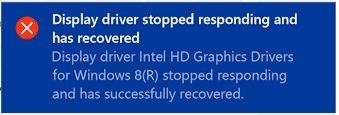
- The video card device driver crashes and restarts. In this case you will often get a message in the Window's system tray, saying, "Display driver stopped responding and has recovered".
- Loading the system too heavily, particularly with other graphics related tests (e.g., GPGPU) and running the DX12 test. In this case the DX12 test can time out by taking too long to launch the test and the message "3D Graphics, timed out waiting for DirectX 12 test to complete" can appear in the trace log.
Things you can try to narrow down the issue:
- Decrease the duty cycle for other tests, particularly the GPGPU test.
- We have had feedback that a Microsoft bug may cause this problem, please patch your system with KB 2979265 (if applicable) and retry.
- Check you are using the latest device driver for your video card.
- Check that the screen saver has been turned off.
- Do not Ctrl-Alt-Delete on the keyboard during the test.
- Do not run an application with elevated administrator privileges during the test
- Check that power saving options have been turned off. Including options like "Turn off display after X minutes".
- Do not use a KVM switch.
- Check the windows event logs for any video device driver crashes around the time that the test was interrupted. From Windows Vista there is also a specific event when Windows restarts the device driver.
- Try running without the RAM test (low memory conditions can cause Windows to turn Aero theme off automatically).
- Change the Windows Aero theme to basic before starting the test
- We have had a report that testing on unactivated versions of Windows can lead to notifications that interrupt the 3D test. If you have this issue and have not activated Windows, and have tried all the above, then we suggest either activating Windows or disabling all pop-up notifications.
Example driver crash window
Intel Haswell iGPU
After receiving quite a few reports of this issue on the Intel Haswell iGPU we have investigated further. We were able to reproduce the problem on a Haswell CPU/iGPU (i7-4770/Intel(R) HD Graphics 4600) desktop running 64-bit Windows 7 with older Intel HD Graphics drivers. This issue appears to be resolved with Intel HD Graphics driver for Windows 15.36.14.64.4080 (10.18.10.4080) - it is recommended this be the minimum driver version used.
In addition to the reasons shown above, we have found in our testing that this issue is caused by the Intel graphics card device driver timing out and recovering. This occurs with the driver 10.18.10.3958, and it seems to occur more frequently with an older driver. We could not reproduce the problem with driver 10.18.10.4080.
For reference, the following is a description of the problem when using driver 10.18.10.3958:
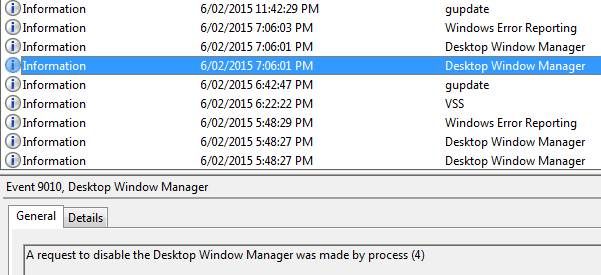
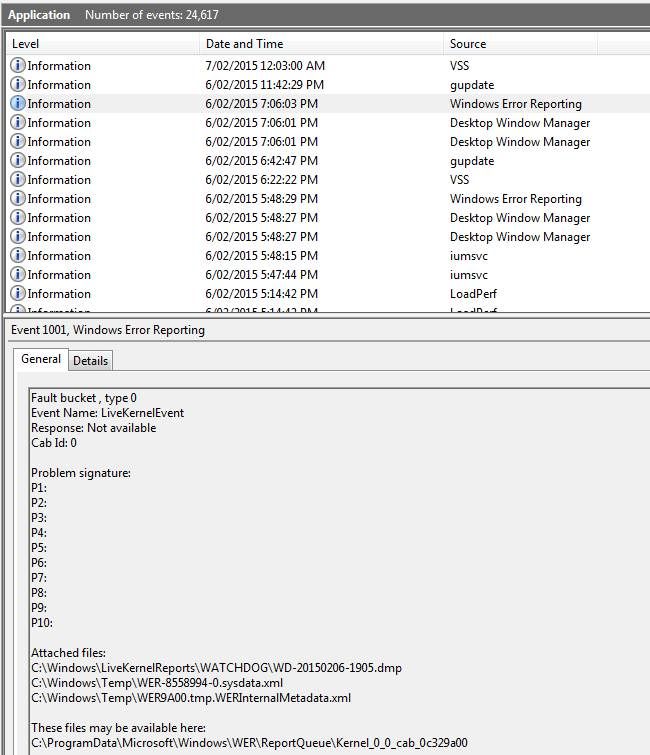
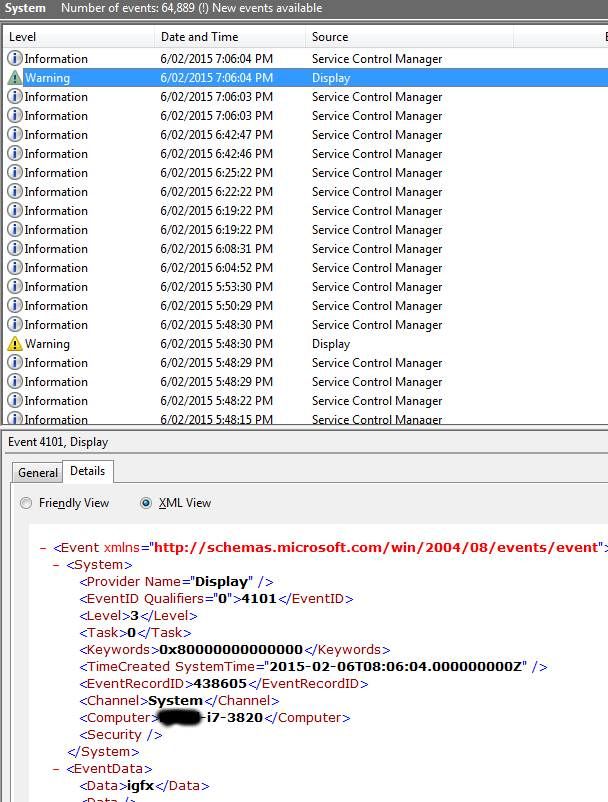
The System and Application event logs should be checked around the time of the event. To view the events, open Event Viewer, expand "Windows Logs" and select "Application", look for "Desktop Window Manager" and "Windows Error Reporting" events around the time the 3D test was interrupted event occurred (see example from our test lab below). Then select "System" events and look for "Display" Warning events (e.g., Display driver igfx stopped responding and has been successfully recovered).
In our testing, the following occurred when running just the BurnInTest PRO v8.0.1031 3D test:
- The Application event log shows a "Desktop Windows Manager" “A request to disable the Desktop Window Manager was made by process (4)”, (i.e., by the Operating System).
- The Application event log shows a "Windows Error Reporting" event and the crash dump produced by Windows Error Reporting shows a timeout in igdkmd64.sys (VIDEO_TDR_TIMEOUT_DETECTED (117) - The display driver failed to respond in timely fashion.)
- The System event log showed a "Display" Warning event ("Display driver igfx stopped responding and has been successfully recovered").
These events caused the "3D test was interrupted" reported by the BurnInTest 3D test.
Event viewer screenshots for reference
1. Application event log
2. Application event log
3. System event log
Problems with 2D and 3D testing on Windows 2003 server and Windows 2008 server?
In Windows 2003 and 2008 server, (and .NET server) all video card acceleration is turned off by default. In BurnInTest you will see the error, 3D Graphics test: Error initializing Direct-X device You need to manually turn it back on if you plan to do video testing. It seems that Microsoft's position is that this acceleration is not required for typical server functionality, to fix this:
1. Start the Display applet in Control Panel (go to Start, Control Panel, then click Display).
2. From the General tab, click Advanced, then select the Troubleshoot tab.
3. Move the "Hardware acceleration" pointer to Full.
BurnInTest crashes at the start of testing. This might result in a hardware reset, an invalid page fault or a partial crash with a window being empty (black).
If BurnInTest creates a detailed (minidump) debug file, please email it to us, e.g., C:\Users\<username>\Documents\PassMark\BurnInTest\BurnInTestx64-V8.0 Pro-0016 Beta-20140516-153342-6252-5320.dmp
The most common reason for a fault like this is a problem with the 3D test which uses DirectX 9.0c.
There are several video card drivers that do not support hardware accelerated DirectX correctly or have bugs under particular versions of Windows. This can result in a system crash and sometime strange rubbish appearing on the screen. What you should do is:
- Prove that the crash was in fact caused by DirectX. This can be done by turning off the 3D Graphics test in BurnInTest and then checking that this prevents the crash.
- Check that you are using the latest certified video driver for your video card (ask your computer / video card supplier or check their web page).
- Use the "DxDiag" program to verify your drivers and test Direct3D. You should find "DxDiag" in C:\Windows\System or in C:\Program Files\DirectX\setup.
Several hardware manufacturers produce video cards which have very poor software support for 3D graphics (DirectX). This is especially the case for the cheaper, bottom of the range video cards. Poor drivers can result in strange visual artifacts appearing on the screen, poor 3D performance and system crashes. The old saying of, "you get what you pay for", seems especially true for video cards, Beware.
Temperature monitoring of my USB drive only works sometimes.
We have found that some USB drives can hang (block) on requesting temperature (SMART) information repeatedly. We have observed this with the Seagate "Expansion External" USB drive. When this occurs, the BurnInTest temperature graph will show no results for the USB drive temperature from the point in time that this problem occurs. If you have this problem, it is suggested that you de-select temperature monitoring for this USB drive in BurnInTest Preferences->Temp / Battery.
I have an ATI Radeon video card and after running for a while the system hangs.
Try newer driver versions (and if this does not work, try older ones).
BurnInTest crashes (with rubbish on the screen or a black screen) when the monitor power save feature turns on after X minutes of running.
Some video cards' device drivers seem to have a bug that causes this crash when the monitor goes into power save mode. If you disable the monitor power save feature (from the Power Management window in the Windows Control panel) this resolves the problem. The main offender seems to be the Maxtrox G400 video card. We have had only 1 report of this problem, so it does not seem to be very common.
I get time-out errors during the serial port test.
If you are testing serial ports at a high speed, together with USB ports, it should be noted that some chip sets have been reported to have limitations while under load high load. Contact your manufacturer regarding these types of limitations.
I get an error with the parallel port test, "Error loading parallel port device driver".
This problem can occur when you are running BurnInTest from a networked drive. In this case Windows may fail to load the device driver required to provide access to the parallel port. The only solution, for the moment, is to copy the BurnInTest files to a local drive before running it.
Update 1: This has also been seen, even when BurnInTest is on a local drive. It seems to be a timing issue. BurnInTest will automatically attempt to reload the driver after a delay of a few seconds and the test will continue correctly thereafter.
Update 2: We have one report that with Gigabyte motherboards you need the latest VIA chip set drivers to get the parallel port test working.
For the parallel port test, the detailed log file indicates some errors, which are not, indicated in the main window of the BurnInTest. Why?
If a byte is read from the parallel port and it is determined to be wrong, then there is a 2nd attempt to read the same byte (at least 10ms after the 1st attempt). If the 2nd attempt gets the right value, then there is no error reported in the main window. If the 2nd attempt also gets a wrong value, then the error count in the main window is incremented. In the case of corrupted data being received during the parallel port test the following information is included in the log file.
Sent = the byte value sent to the parallel loopback plug
Rec = the byte value returned from the parallel loopback plug
Att = Read Attempt 1 or 2 (see above)
RawByte = When a byte is read from the pins on the parallel port the bits are in the wrong order. This is the RawByte. After the bits are put back in their correct order then they should match the Sent byte. This is displayed mainly for our debugging purposes.
I get the error, "No permission to open RAW network socket" with the Network test.
You need to have administrator privileges to run this test. In Windows 2000, there is no way to disable this security check. Access to Raw Sockets is granted on a per-transport basis. For the address family AF_INET, only administrators have the access necessary to create Raw Sockets.
When running BurnInTest I get a bluescreen crash with the error message DRIVER_IRQL_NOT_LESS_OR_EQUAL in iaStorA.sys
This appears to be a bug in the Intel RST device driver (iaStorA.sys) that is provoked while trying to read SMART data from a hard disk (in particular the SMART temperature information) while the disk is under load.
The current workaround is to increase the "sample every x seconds" (on the Temp/Battery tab of the BurnInTest Preference) value to 10 seconds or greater to reduce the chance of this bluescreen occurring or disable the temperature monitoring for the disk.
I get the error "Failed to play back MIDI via sequencer".
Several causes of this problem over the years have been discovered:
- Microsoft process, Audiodg.exe. As outlined in KB981013, there is a memory leak issue with the Audiodg.exe process in Windows Vista/7, but not Windows 8.
- Lenovo investigated an occurrence of this problem with their ThinkPad laptops in mid-2012 and found that this problem was caused by a memory leak in the Conexant audio device drivers.
- Low memory situations, which can occur where there is a memory leak in an application or device driver.
- Known issues in windows 10 that affect some systems which may be driver issues. There was a bug fix in version 8.1 build 1010 that fixes one cause of this problem so make sure you are using this version or newer.
We believe most of the MIDI related errors are due to device driver bugs and lack of testing of MIDI features being done by the sound hardware manufacturers. It’s also possible there may be some operating system bugs as the API used for accessing the MIDI functionality (BurnInTest uses Windows MCI/MIDIMapper to play back test MIDI files) is becoming obsolete and deprecated.
MIDI is no longer a widely used feature and is generally only used by specialist audio engineers and musicians. If MIDI is not considered an important function for your system, you can edit the BurnInTest error classification file (BITErrorClassification.txt) and downgrade the MIDI related errors from SERIOUS to WARNING or INFORMATION. See “Configuring Error Classifications” in the “Event Log” page of the BurnInTest help.
Assuming that the problem is caused by a memory leak in the audio device driver while playing back just a MIDI file via the built-in Windows MIDI mechanism, we believe the impact of this error should be minor and probably only occur with users of low-end MIDI software over longish periods of heavy usage. In such a case it is likely the MIDI software would fail and need to be restarted. High-end MIDI software in many cases does not use the Windows mechanism to play back MIDI (but uses their own implementation) and would likely be unaffected.
Issues with Intel MIPI Camera.
There is currently a known issue when there is an Intel MIPI camera on a system and both BurnInTest and the Microsoft Windows Store Camera App are launched at the same time.
In some cases, BurnInTest is accessing the camera at the same time as the Microsoft camera app and as this access is exclusive the camera app will not be able to access the camera and will not load correctly. The camera is accessed using the "Microsoft Media Foundation" functions, which the Intel driver also uses, currently these functions do not allow shared access of the camera device.
Allowing BurnInTest to finish loading before launching a camera application should prevent this issue from happening.
I get the error, "2D Graphics, Surface lost: Restoring." with the 2D test.
The most common cause of this error is if a KVM switch is in use or the monitor is turned off / goes to sleep. For the test to run, a monitor must be present on the system.
I can't see temperatures or there is missing system information when using Windows 7.
Your windows 7 installation may be missing some security patches required in order to validate SHA256 (SHA2) digital signatures. This will stop a device driver (Directio64.sys) from being loaded and some system information and temperatures cannot be collected (the start service command will fail with error code 577 - Windows cannot verify the digital signature for this file).
There are two windows security updates that need to be installed to enable SHA2 support, KB4474419 and KB4490628 .
Reporting
Can I add my company logo and company information to the BurnInTest test certificate report?
Yes. The test certificate introduced in BurnInTest 5.0 is a HTML document (BITCertificateTemplate.html). It is almost completely customizable, such as style, your company logo, company information and the certification statement. The only 'fixed' component of the report is a tag <!--BITCERTIFICATE--> that marks where BurnInTest will insert the results information.
You will need an HTML editor to modify the test certificate for your company. For example:
(1) To insert your Company Logo, the first item in the <body> of the HTML file is a <table> containing your company name and logo as a gif file:
<p>Put your company logo here:</p>

                            <img src="./Passmark_logo3.gif">
You should modify the text in the first line to be your Company name, and change the logo gif filename to a file containing your company logo.
(2) To change your company information, you should edit the footer in the HTML file:
<div class="footer">
Put your company name here:<br>
Level 5, 63 Foveaux St, Surry Hills, 2010, Sydney, Australia<br>
Phone + 61 2 9690 0444 Fax + 61 2 9690 0445<br>
E-Mail: test@example.com<br>
</div>
Please see the "Preparing a Customer Test Certificate" (index item "Test Certificate") in the BurnInTest 5.0 help file for more information on modifying the test certificate.
Test Automation
Is there any way that BurnInTest can be used in an automated fashion, on a production line?
There are several features built into BurnInTest to help automate system testing. This includes several command line parameters like: "/r" - run BurnInTest tests automatically, "/m" - display the machine ID data entry window on BurnInTest startup, "/c" - load a user defined configuration file on BurnInTest startup, "/s" - run a user defined test script on BurnInTest startup.See our white paper on this subject and BurnInTest help.
How can I setup BurnInTest to run from a USB drive under Windows?
It is possible to install BurnInTest onto a USB drive such that no installation is required on the test system. This can be useful in several scenarios, such as field staff testing PC's without installing BurnInTest on the test system. When running BurnInTest this way, there will be no files left on the PC after BurnInTest has finished. When BurnInTest is run from a removable drive when installed in this way, the default directory for the users' files (like reports and the configuration file) is the BurnInTest directory, rather than the normal default directory of the users Documents directory.
Installing BurnInTest to a USB drive
This installation process can be performed for a USB drive installation (any writable drive) using the menu option "File -> Install BurnInTest to a USB drive".
From the "Install BurnInTest to a USB drive" window, you need to specify:
1) The USB drive and directory you want to install BurnInTest to. For example, "F:\BurnInTest". BurnInTest will create the directory if it does not exist.
2) The type of installation. If you have a license key, then select Licensed, otherwise select Evaluation for a trial period.
3) If you selected a "Licensed" installation type, then enter the Username/Key.
When you select install, BurnInTest will create the directory on the USB drive (e.g., F:\BurnInTest), copy all the files from the BurnInTest directory (e.g., C:\Program Files\BurnInTest) to the USB drive (e.g., F:\BurnInTest) and install the license information onto the USB drive.
Self-booting USB drive
To make a self-booting USB Flash Drive, bootable optical disk or PXE boot, please see support item "Can I setup BurnInTest to self-boot (e.g., from a USB drive) to test my system without an operating system?".
I am not using the 3D test and do not want to install or update DirectX. Can I skip the DirectX warning message on startup?
Yes. Start BurnInTest with the "/x" command line parameter (see BurnInTest help for more details).
How can I set BurnInTest to auto start at logon in Windows 10?
As BurnInTest requires elevated administrator permissions it cannot be auto launched by placing it in the startup folder as windows blocks execution of shortcuts like that that require a UAC prompt for the elevated permissions.
Instead, a scheduled task needs to be created, open the Windows Task Scheduler, and create a new task. When creating the task be sure to check the "Run with highest privileges" option on the general tab, choose the trigger for launching BurnInTest (e.g., at log on) and then add an action of "start a program" pointing to the location of bit.exe.
General comments about occasional system crashes
Here are some general comments about occasional system crashes.
Common causes for a system crash are device driver and hardware problems. When a system crashes it will display a diagnostic screen (Blue Screen Of Death) or restart, depending on your systems configuration. If a BSOD is displayed it may display helpful information, such as the name of the device driver that crashed. If this is the case, then update that driver, or uninstall the related hardware/driver if possible. Otherwise, you can use this diagnostic information to search the Internet for possible solutions to your problem. If your system is configured to restart on a system failure (System->Advanced->Startup and recovery, Settings->System failure=automatically restart), then investigating a Kernel memory dump (e.g., \Windows\Minidump\*.dmp) can be helpful to identify the faulty component.
Excessive heat can cause a system to fail over time, so monitoring the temperature while stress testing the system can help identify this. The solution could be fixing/cleaning fans, re-doing the CPU grease or adding more cooling.
Problems can occur if your computer runs out of system resources because there is some process or driver that does not release memory, handles, semaphores, etc. back to the operating system. After a long period of uptime Windows runs out of resources and dies a terrible death. What can you do about this? Identify the offending software, if you can, and disable it. This can even be a bug in the Operating system however.
Computer can have a Random Crash. What do we mean by this? Many things can bring down a computer. Typical things would be a spike on the power line, a strong burst of Electromagnetic interference (e.g., Mobile phones, electric motors, etc..). If your system is running at its limits due to overclocking or your components are running at the top of their temperature range, small external influences can push your system over the edge, resulting in a terrible death. If you believe in Chaos theory (and most scientists now do), then you also must believe that computers will just crash unexpected from time to time, how often would depend on the design tolerances built into your hardware. What can you do about this?
- Do as the military do. Buy military specification computer hardware that has higher tolerances.
- Do what NASA does. Run 3 computers at the same time, expecting one to give the wrong answer or crash.
- Do what most big banks do. Run a hot standby system, that can take over the job of the main computer in a few seconds.
- Do what the Telecommunications industry does. Buy equipment with N+1 redundancy and switch traffic off the faulty hardware. Almost all Telecommunications hardware also has a built in Auto-reboot function. Why? because they know it will eventually fail.
Timing issue. Some software / hardware bugs only show up in very rare occasions. Classic examples of this are Hardware or Software Interrupts occurring in a critical section of code. What can you do about these types of bugs? Almost nothing as a user. They have plagued software since the first line of code was written they are very difficult problems to find and are almost never picked up during software testing. Problems can occur in Drivers, the operating system, your hardware, everywhere. As everyone is always on a tight deadline, endurance testing often does not make it into a software developer's test plan.
Mundane program bugs are, of course, also a major cause of failure.